Remove EXIF Metadata from Photos (Free, Online)
See what metadata your photo carries — then remove it, privately.
Drop your photo here
or click to choose
Supports: JPEG, JPG (up to 30 MB)
Tip: you can also paste an image with Ctrl+V / ⌘V.
This tool processes on your device; your file is not uploaded for processing.
About
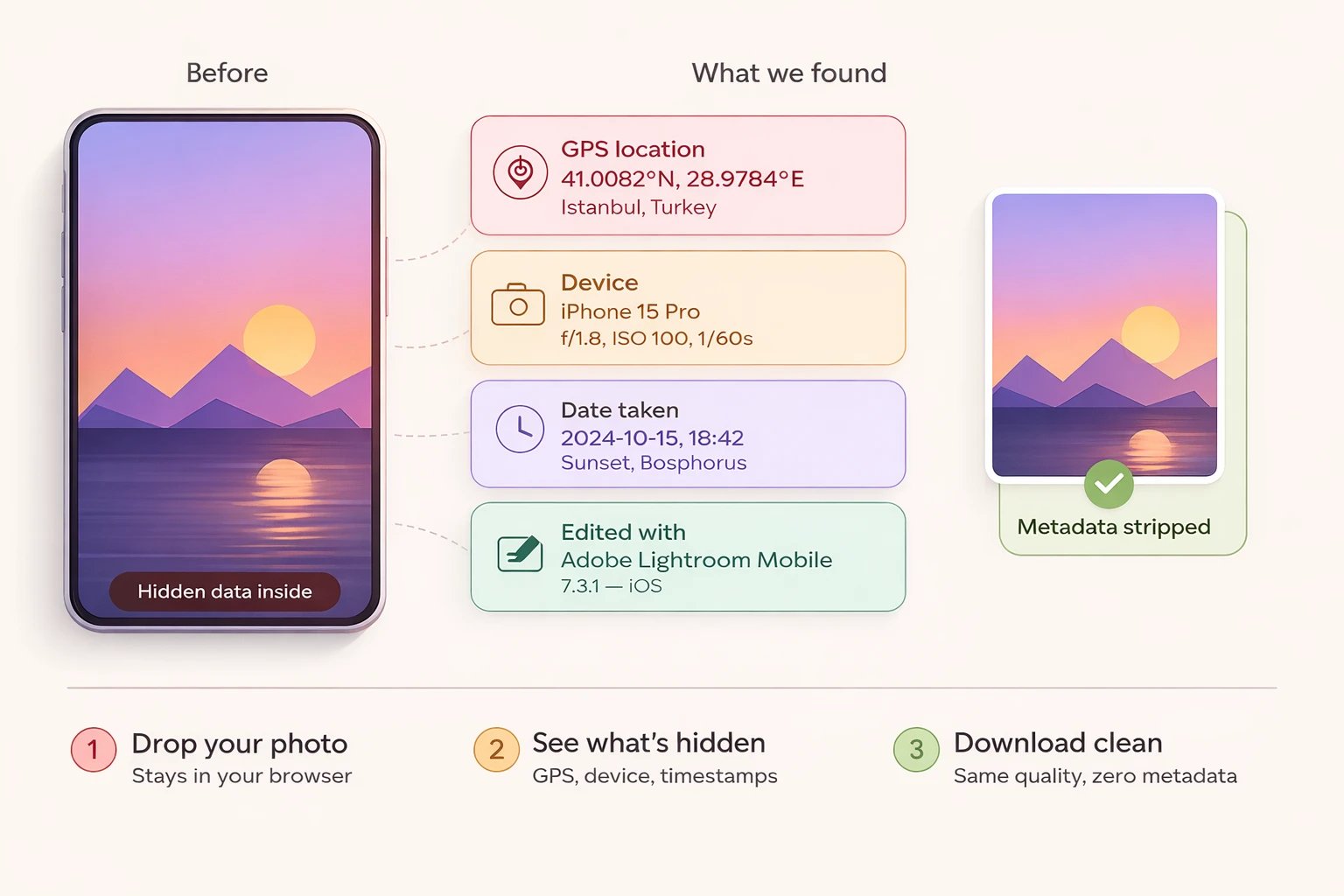
EXIF metadata is one of those quiet privacy issues that most people don't think about until they accidentally publish their home address on Twitter, send a buyer the GPS coordinates of where their products are stored, or post a photo of a child whose location is now embedded in the file forever. Every JPEG taken with a modern phone carries an extensive list of metadata tags: GPS coordinates accurate to a few metres, exact timestamp including seconds, camera model and serial number, lens information, ISO and exposure settings, the flash mode used, the white balance setting, sometimes even the orientation the phone was held in and the altitude above sea level. Most of this is technical and harmless; some of it is genuinely sensitive in the wrong context. The tool here removes whatever you choose to remove, gives you control over the categories rather than treating it as all-or-nothing, and runs entirely in the browser so the file never leaves your device.
GPS coordinates are the single most consequential piece of EXIF metadata, and the one most people are surprised to discover their photos contain. iPhones and Android phones embed location by default — you can turn it off in settings, but most people never do, and the photos accumulate location data invisibly. The implications get real once a photo is shared publicly: a casual post of your morning coffee shows the coffee shop's address; a photo of your child playing in the yard reveals your home address; a product photo for an online listing reveals the warehouse location. Stripping GPS before publishing is a small habit that prevents an entire category of accidental disclosure, and the cost of doing it is the few seconds the conversion takes.
Device fingerprinting is a more subtle issue that comes up in journalism, activism, and security-sensitive contexts. The combination of exact camera model, serial number, lens, and software version creates a fingerprint that can link multiple photos to the same device — useful for forensic investigators, useful for adversaries trying to identify a leak source. A whistleblower sharing photos of internal documents who hasn't stripped EXIF is leaving a trail back to their specific phone, even if other identifying details are absent from the visible image. For most people this isn't a real concern, but for people whose work depends on source protection, removing device fingerprints from photos before publication is non-negotiable.
Timestamp metadata sits in the middle ground between obviously sensitive and obviously fine. The timestamp on a vacation photo is usually harmless and sometimes useful — it tells the recipient when the photo was taken, which is part of the social context. The timestamp on a photo used as evidence in a workplace dispute is potentially valuable. The timestamp on a photo of a sensitive document tells anyone who sees the photo exactly when the document was photographed, which can be a clue about who had access at that moment. Whether to strip the timestamp is genuinely context-dependent, which is why the tool here lets you keep categories selectively rather than nuking everything indiscriminately.
The 'edited by' software signature is the metadata category most people don't realise exists. Photos that have been processed in Photoshop, Lightroom, Snapseed, VSCO, or any other editing tool typically carry a software tag identifying the editor. For commercial photographers this is fine — the editing software is part of the trade. For everyone else it's noise that occasionally tells more than intended: a photo with 'edited in Photoshop' tags suggests deliberate manipulation; a photo with 'phone gallery export' tags suggests it's roughly as it came out of the camera. Stripping the software signature is a small move toward making the photo speak for itself rather than coming with implicit metadata about its production.
There's a forensic angle on EXIF that's worth understanding because it cuts both directions. EXIF metadata is occasionally used as evidence in legal proceedings — to establish when a photo was taken, where, and on what device, all of which can support or undermine a claim. Stripping EXIF before submitting a photo as evidence might make it less usable for that purpose; preserving EXIF intact is sometimes the right call when the metadata supports the user's position. The tool here gives you the choice rather than making it for you, because the right answer depends on which side of the evidentiary question you're on. For social sharing strip everything; for legal evidence consider preservation.
Real estate listings are a use case that benefits specifically from selective EXIF stripping. A property listing photo carries GPS coordinates of the property, which is fine — the listing is publicly disclosing the property's location anyway. But the photographer's device information, the exact time of day the photo was taken, and the editing software are all noise that doesn't add value to the listing and might create operational small leaks (a competitor learning that all your listings are photographed by the same device, for example). Stripping device and software metadata while preserving the explicit location data is the targeted approach.
Social media platforms have inconsistent behaviour around EXIF, and this is worth understanding because it affects how much of this work the platform does for you. Instagram strips EXIF on upload — your photos lose their metadata when they go through Instagram's processing pipeline. Facebook similarly strips most metadata. Twitter and X retain some metadata depending on the upload path. Reddit varies by client. Personal photo-sharing platforms like Google Photos and iCloud retain everything by design. The pattern: assume nothing about platform behaviour, and if EXIF stripping matters, do it yourself before upload rather than trusting the platform to handle it.
The browser-side processing model is worth noting because it's a meaningful privacy property in itself. The tool reads the JPEG file's bytes in the user's browser, parses the EXIF segments, displays what's there, and produces a modified output — all without the file ever being uploaded to a server. The original file never leaves the user's device. For users handling sensitive photos (legal evidence, medical images, internal corporate material) this matters, because uploading the file to remove its metadata defeats some of the purpose; the metadata stays in transit logs, server caches, and CDN edges even if the destination service deletes its copies promptly. Browser-side processing avoids all of that.
There's a final practical note worth making about thumbnails. Some EXIF blocks include an embedded thumbnail of the photo — a small preview version, often a few hundred pixels wide, used by photo viewers to render quick previews. The catch with embedded thumbnails: they don't always update when the photo is edited, which means an EXIF thumbnail can sometimes preserve a version of the image from before edits were made. There have been real privacy incidents involving someone publishing an edited photo (cropping out a sensitive element, for example) only to have the original uncropped version visible in the EXIF thumbnail when investigators looked. The metadata-removal here strips embedded thumbnails along with the rest of the EXIF block, which closes that subtle exposure path.
Photo journalism and citizen documentation are use cases where this tool earns its keep in a different register. A bystander photographing a protest, a witness documenting an incident, a citizen recording an environmental violation — all of these may want their photo to be useful as a record without exposing themselves through device fingerprinting and location metadata. Stripping device tags while preserving the timestamp and GPS (which support the photo's evidentiary value) is the targeted choice; stripping everything is the safer default when the publisher is the one taking risk. Either way, doing the choice deliberately rather than letting the platform's defaults decide is the practice that distinguishes thoughtful sharing from accidental exposure.
Operationally the tool takes a single drop. Drop the JPEG (or PNG, where it has metadata in similar tEXt and iTXt chunks), see what metadata is present grouped by category, choose what to remove and what to keep, download the cleaned file. Files are processed entirely in the browser, never uploaded, never stored. Multiple files can run through one after another in a single session — useful when cleaning up a folder of photos before sharing rather than handling a single one-off cleanup. The cleaned output has the same visual bytes as the original — same image data, same colour profile — just without the metadata that was selected for removal.
Use cases
- Remove GPS coordinates before posting a photo online.
- Strip camera/device details when sharing with clients or on social media.
- Clean capture dates or software tags from edited images.
- Verify whether an image is already free of EXIF metadata.
How it works
- 1Upload a JPG/JPEG photo (drag, paste, or choose a file).
- 2Review detected metadata categories (GPS, device, capture, software).
- 3Remove everything at once or keep selected categories, then download the cleaned photo.
FAQ
Do you upload my photos?
No. EXIF detection and removal runs locally in your browser.
What formats are supported?
This tool removes EXIF from JPG/JPEG files. If you have HEIC, convert it to JPEG first.
Will the image quality change?
No — the tool strips metadata without re-encoding the pixels.
Can I remove only GPS and keep other data?
Yes. Switch to selective mode and choose which categories to keep.